
As an Amazon Associate I earn from qualifying purchases.
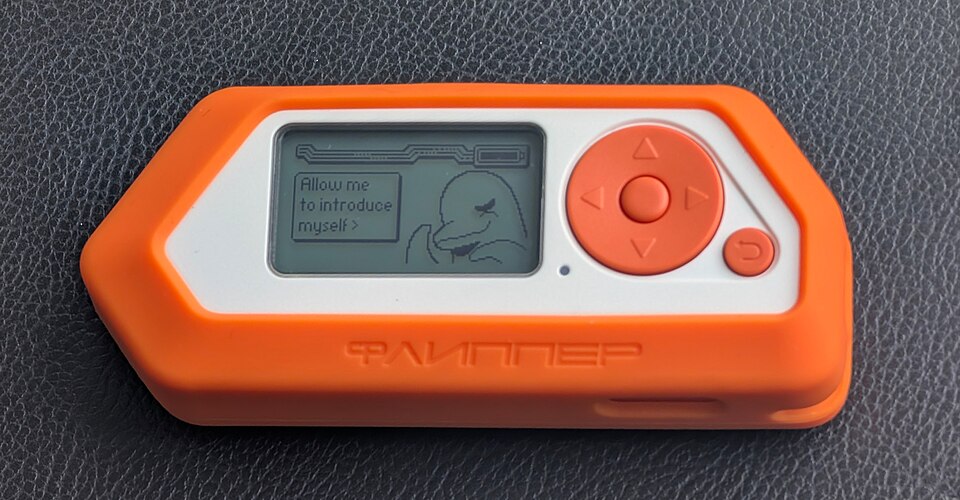
Flipper Zero is a portable electronics learning and diagnostic device, not a magic universal remote or a shortcut around security. Its unusual combination of radio, NFC, RFID, infrared and GPIO tools makes it interesting for authorized experimentation. The photograph shows the genuine Flipper Zero fitted with an optional orange silicone bumper, which is not necessarily included in a standard purchase.
Editorial research guide. An exact-product Amazon affiliate purchase link has not been verified and is not included. No hands-on testing or live price claim is made.
Who should consider Flipper Zero
Hobbyists learning about embedded electronics, technicians checking their own equipment and security professionals conducting explicitly authorized assessments are the most natural audience. Beginners can also enjoy its playful interface, but should be prepared to read documentation and learn the limits of each protocol. It is less compelling for someone expecting a turnkey solution for every smart-home or access-control device.
Hardware and supported interfaces
Flipper’s official technical documentation describes sub-GHz radio hardware for supported regional frequency bands, a 13.56 MHz NFC transceiver, 125 kHz RFID capability, infrared receive/transmit functions and accessible GPIO pins. A monochrome LCD and physical navigation buttons keep the interface self-contained. These interfaces are not universally compatible with every modern system.
Regional and legal considerations
Radio frequencies and transmission permissions vary by jurisdiction. Some functions may be restricted by firmware, hardware configuration or local law. Users should operate only with devices and credentials they own or have explicit permission to test. The ability to read a signal does not mean a modern encrypted access system can be copied or that doing so is authorized.
Learning curve and software
The device is more useful when paired with current official firmware, supported apps and documentation. Certain features require a microSD card or external expansion hardware. Beginners should factor in time for learning protocol basics and troubleshooting. Community projects can be valuable but are not guaranteed to be secure, maintained or compatible with every firmware version.
Accessories and ownership cost
An optional protective bumper, microSD card, development boards and other accessories may increase the effective cost. The orange case in the photo is an accessory, not proof of a bundled configuration. Confirm which components the seller includes and whether warranty and firmware support are available in your country.
Alternatives and limitations
For purely infrared control, a dedicated universal remote may be simpler. For microcontroller learning, a Raspberry Pi Pico or Arduino-compatible board is often less expensive and more directly suited to coding circuits. For professional RF analysis, specialized laboratory tools can be more capable. Flipper Zero’s strength is combining several interfaces into one portable learning platform.
Buying checklist and verdict
Verify the exact device, seller legitimacy, included USB cable and accessories, charging, screen and button operation, microSD support, local import rules and warranty. Avoid unsupported claims about unlocking, bypassing or copying secure systems. Flipper Zero is worthwhile for curious, responsible users who want to learn how everyday electronics communicate, not for people seeking a universal bypass tool. See official Flipper Zero technical specifications and our Raspberry Pi Pico 2 guide.