
As an Amazon Associate I earn from qualifying purchases. This independently researched editorial guide does not currently contain a verified Amazon affiliate purchase link.
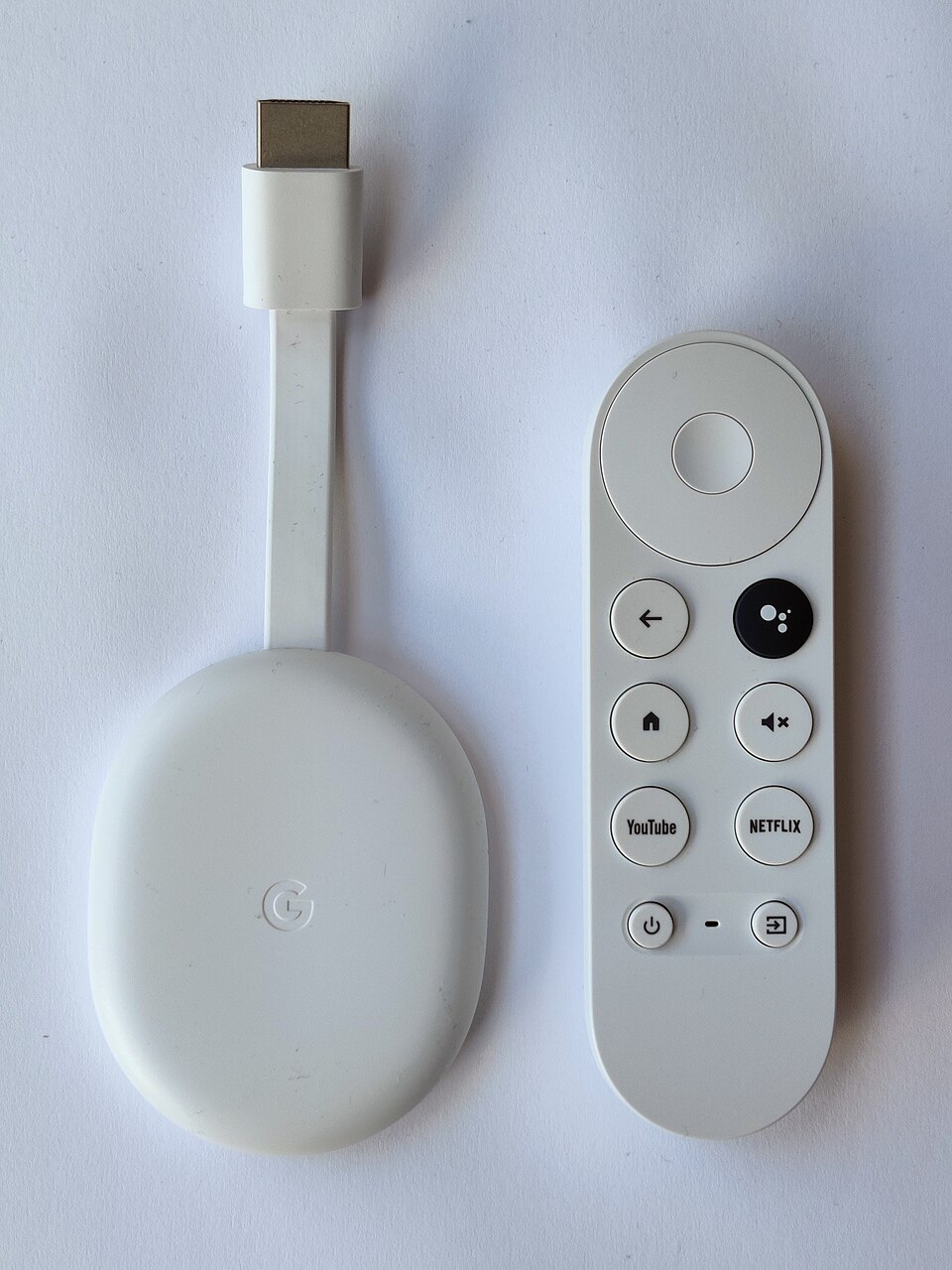
Google’s Chromecast with Google TV brought a dedicated remote and full television interface to the Chromecast family. With newer streaming hardware now available, the most useful question is whether a discounted or secondhand 4K unit still fits your television and streaming habits. The licensed photograph shows the Chromecast with Google TV family and its remote; it does not independently prove whether the pictured unit is the 4K or HD variant.
What exactly is the 4K model?
Google lists the Chromecast with Google TV (4K) as an HDMI streaming device supporting output up to 4K Ultra HD at 60 frames per second, HDR10, HDR10+, Dolby Vision and HLG, subject to the television and content. It uses 802.11ac Wi-Fi on 2.4 and 5 GHz and Bluetooth 4.2. Its USB-C connection supplies power, and Google lists an optional Ethernet power adapter. This guide concerns the 4K model, not the later 1080p HD version, even though their housings look similar.
Why a dedicated remote matters
Unlike early Chromecast dongles that relied mainly on a phone to initiate playback, Google TV offers an on-screen interface for browsing installed streaming apps, discovering titles and managing playback with a physical voice remote. This can make the device easier for guests or households that prefer conventional television controls. Google Assistant functionality and service availability may depend on language, account, country and updates.
The television and network requirements
A 4K badge on a streaming box does not turn an older HD television into a 4K panel. Google recommends a compatible 4K TV, 4K content, suitable HDMI/HDCP support and a reliable broadband connection; some subscriptions charge extra for UHD. For best results, verify that your television accepts the desired HDR formats. Wi-Fi interference, router placement and streaming-service compression can limit quality even when the hardware supports 4K.
Where the older hardware shows its age
The device is less attractive if you need many apps installed simultaneously, especially compared with newer streaming boxes offering more memory or storage. Software support and app availability can change over time, so verify the current versions of the services you use rather than assuming every app shown in an old advertisement is still supported. A secondhand unit may also lack its original remote, power adapter or USB-C cable.
Chromecast 4K versus the HD variant
The cheaper Chromecast with Google TV (HD) targets up to 1080p HDR at 60 frames per second. If your screen is strictly 1080p, that may be adequate, while a 4K television can justify the higher-resolution model. Buyers should check the actual device model or seller documentation, not rely on the appearance of the white remote or dongle. The photograph used in this article documents the family design rather than a legible 4K model marking.
Chromecast versus Google TV Streamer
Google’s newer Google TV Streamer (4K) includes an Ethernet port, 32 GB storage, 4 GB memory and Matter/Thread smart-home functions according to Google’s specification page. Those are meaningful differences for a buyer who uses many apps or smart-home integrations. The older Chromecast remains a compact choice for basic streaming, but it is not automatically the better value when newer devices are discounted.
Practical pros and cons
Strengths include compact HDMI installation, a physical remote, 4K HDR support on the correct variant and access to the Google TV interface. Limitations include aging hardware, potential app/storage constraints, reliance on compatible subscriptions and the risk of buying the wrong HD model from an imprecise listing. No firsthand streaming performance, current price or availability is claimed in this review.
Used-purchase checklist and verdict
Confirm the exact 4K model, original remote, power supply, reset status, HDMI compatibility, Wi-Fi stability, Google account sign-in and return policy. For a simple spare-room TV, an inexpensive functioning unit can be sensible. For a main living-room setup with extensive apps and smart-home requirements, compare newer hardware before buying. No Amazon purchase link has been verified for this exact model.
Manufacturer references and related guides
Specifications: Google Chromecast and Google TV Streamer technical specifications. Setup and 4K requirements: Google’s 4K streaming support guide. For other home-entertainment devices, see BuyTheGadget’s Fire TV Stick 4K Max article.